Skill Engineering, Part 3: Governance
This is Part 3 of a six-part series on Skill Engineering. Part 1 — Foundations covers what skills are. Part 2 — Creation covers how to forge them.
Chapter 12 — Versioning
Skills change. The environments they describe change. The team’s understanding of the right procedure changes. Versioning is how the team tracks those changes, communicates their significance, and reasons about which version of a skill is installed where.
The reference library uses semantic versioning: MAJOR.MINOR.PATCH.
The bump rules
PATCH — a refinement that does not change the skill’s external behaviour. A clarification in the prose, a new troubleshooting entry for a known failure, a tighter assertion in the eval file. Users of the skill at version 2.3.0 can safely use 2.3.1 without adjusting anything.
MINOR — a new capability that is backwards-compatible. A new failure mode handled in the Instructions section, a new pitfall recorded and its absent_regex added, a new optional step. Users at 2.3.0 get improved behaviour from 2.4.0 without any breaking change.
MAJOR — a breaking change. A change to the routing signal (the description changes and the skill may now be invoked for different requests), a change to the required providers (a new auth.providers entry means the caller needs a new login), a fundamental change to the procedure that makes the old Instructions section wrong. A user at 2.x.y may need to act before upgrading to 3.0.0.
What “breaking” means for a skill
Breaking changes are different for skills than for APIs. An API breaks when callers can no longer send their existing requests and receive sensible responses. A skill breaks in several different senses:
Routing breaks if the description changes in a way that the harness no longer routes the same user requests to the skill. A user who relied on “the agent runs diagnose-product-status when I say the product is stuck” may find that a description change routes the same prompt to a different skill, or to no skill.
Environment breaks if a new required provider or CLI tool is added. The skill at the new version will fail for any caller who has not added the new provider or installed the new tool.
Behaviour breaks if the procedure changes in a way that callers have built expectations around. A workflow that other workflows depend on and that previously returned a specific output shape: if that shape changes, the dependent workflows may fail.
All three are MAJOR bumps. The team should not use MINOR for changes that are “only a little breaking.” If there is any break, it is MAJOR.
A worked version history
1 | v0.1.0 — experimental; basic procedure, three evals |
The version history, read forward, is a condensed version of the history ledger. Each bump corresponds to a history entry; the bump size communicates the change’s significance without requiring the reader to read the full entry.
Pre-release suffixes
Skills in active development but not yet stable use pre-release suffixes: 1.0.0-alpha, 1.0.0-rc.1. The suffix signals “do not depend on this in production.” The resolver treats pre-release versions as satisfying only explicit pre-release constraints; a depends_on: ">=1.0.0" will not resolve to 1.0.0-alpha.
Chapter 13 — The Dependency Graph
Twenty skills that depend on each other in undocumented ways are twenty skills that break in surprising ways. The dependency graph is the mechanism by which “what depends on what” becomes explicit, machine-readable, and enforceable.
Declaration
Each skill declares its dependencies in the depends_on block of its frontmatter and manifest:
1 | depends_on: |
The key is the skill name (must match the directory name). The value is a semver range. The resolver reads this declaration and enforces it.
The resolver’s four checks
When a skill is installed or when the library is validated, the resolver runs four checks against every skill’s dependencies.
Existence check. Does the declared dependency exist in the library? A reference to sap-loki fails if there is no installed skill with that name. This catches typos and references to skills that have been renamed or removed.
Version check. Does the installed version satisfy the declared range? If sap-loki is at version 1.9.0 and the skill declares sap-loki: ">=2.0", the check fails. This catches cases where a skill was forged against a newer version of a dependency that the current environment has not yet installed.
Cycle check. Are there any circular dependencies? Skill A depends on skill B, skill B depends on skill A — this is a cycle and the resolver refuses to proceed. Cycles are architectural errors; they indicate that the skills in the cycle should be reorganised (usually by extracting the shared logic into a new primitive that neither depends on the other).
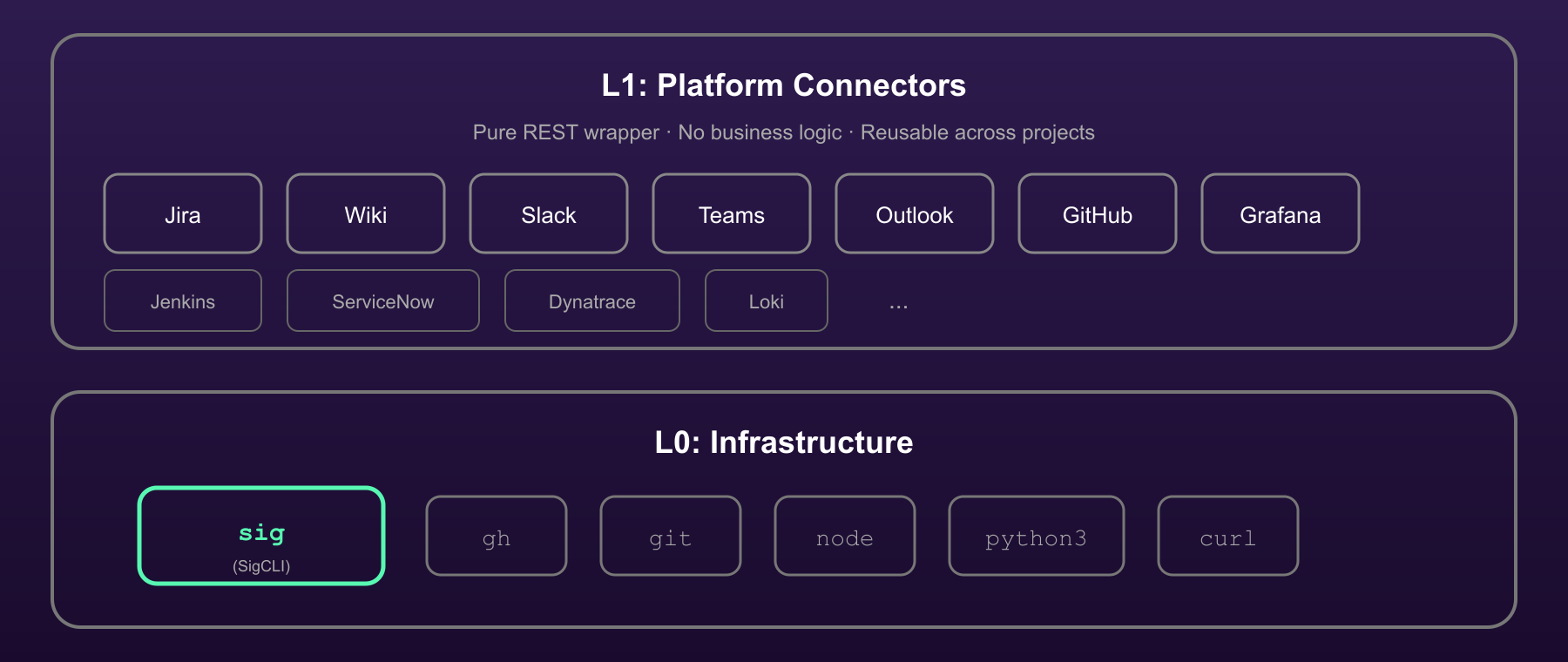
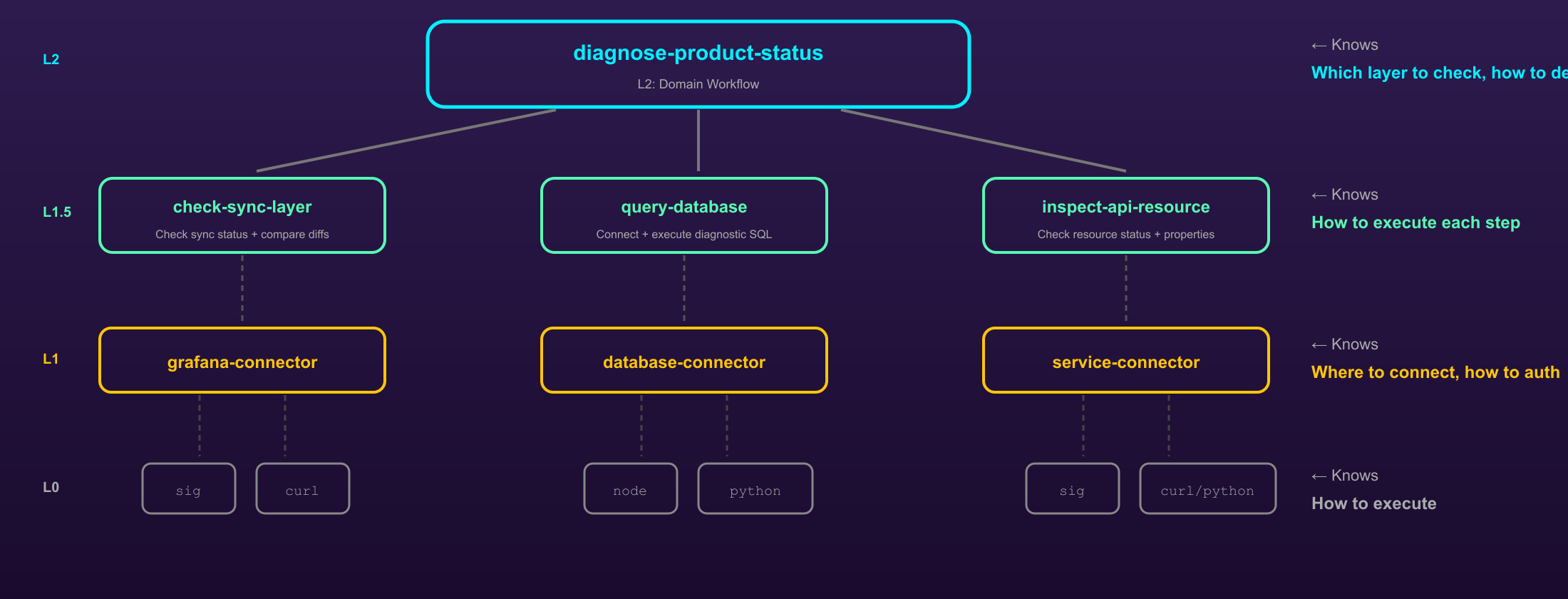
Composition check. Does the dependency violate the layer rules? A connector may not depend on a primitive. A primitive may not depend on a workflow. A workflow may depend on any lower layer. This is the machine-enforced version of the four-role hierarchy from Chapter 4.
Topological sort
After the four checks pass, the resolver computes a topological sort of the dependency graph: an ordering in which each skill appears after all its dependencies. This ordering is used for installation (install dependencies before dependents) and for validation (validate dependencies before dependents).
A topological sort is only possible if the graph is acyclic — which is why the cycle check runs first.
Version conflicts
A conflict occurs when two skills in the graph declare incompatible version requirements for the same dependency. Skill A requires sap-loki: ">=2.0 <3.0" and skill B requires sap-loki: ">=3.0". There is no version of sap-loki that satisfies both.
The resolver reports the conflict with the skills and ranges involved. The resolution is usually one of:
- Upgrade
sap-lokito a version that satisfies both ranges, then update Skill A’s declared range. - Relax Skill A’s upper bound (from
<3.0to<4.0) if the change insap-loki 3.0does not actually break Skill A. - Accept that the two skills cannot be co-installed in the current library state and address the root cause (a breaking change in
sap-lokithat Skill A has not been updated to accommodate).
Version conflicts are the dependency graph surfacing a problem that the team would otherwise discover at runtime. Surfacing it at install time is the correct behaviour.
Chapter 14 — Lifecycle
A skill’s lifecycle is its trajectory from creation to retirement. Five states, with defined transitions.
The five states
experimental — the default for new skills. The skill is in use but not guaranteed to be stable. APIs may change; the procedure may be revised; users who depend on it should expect breaking changes. Corresponds to pre-1.0.0 in semver terms.
stable — the skill is well-understood, its procedure has been validated through use, and the team has committed to maintaining it with the full versioning discipline. Breaking changes increment MAJOR; non-breaking additions increment MINOR; refinements increment PATCH.
deprecated — the skill still works but is no longer the recommended approach. Users should not build new dependencies on it. A deprecation notice in the frontmatter describes what to use instead (or explains why the task it served is no longer performed).
replaced — a specific successor skill has been identified. The deprecated_by field names the replacement. The harness can route calls that would have gone to the replaced skill to its replacement, provided the replacement’s routing signal is compatible.
archived — the skill is no longer maintained, installed, or invocable. The directory remains in the repository as a record; the skill is removed from the installation.
Transitions
The forward path: experimental → stable → (deprecated or replaced) → archived.
Reverse transitions (stable back to experimental, deprecated back to stable) require an evidence file explaining the reversal. They happen: a skill promoted too early, a deprecation that was reversed when the successor proved inadequate. They are not failures; they are decisions, and they deserve documentation.
make doctor
The make doctor target scans the installed library and reports:
- Skills with no harness invocations in the past ninety days (candidates for deprecation or archival).
- Deprecated skills that still have active dependents (the dependents have not migrated to the replacement).
- Skills with outdated dependencies (an installed dependency is at an older version than the skill requires).
- Skills whose evals have not been run in the past thirty days.
make doctor is not an automated fix; it produces a report. The team responds to the report. A library where make doctor consistently produces no findings is a library that is being actively maintained.
Lifecycle and evolution
The lifecycle and evolution loops are not independent. A skill in deprecated state does not enter the evolution loop; there is no point in evolving a skill that is being retired. A skill in experimental state is in the loop but with lighter guardrails (a single reviewer rather than two, looser auto-accept criteria) because the expectation of stability is lower.
The lifecycle state is the team’s signal about how much trust to place in a skill. The evolution loop is the mechanism by which a skill earns the transition from experimental to stable, and by which it stays at stable rather than drifting into silent deprecated territory.
Chapter 15 — Distribution
A skill in a git repository is not a skill in the agent’s context. Distribution is the mechanism by which the git-tracked file reaches the agent at runtime.
Symlinks: the reference approach
The reference deployment uses symlinks. The skill lives in its canonical location in the git repository (e.g. ~/playground/awesome-sap-skills/workflows/diagnose-product-status/). A symlink in ~/.claude/skills/diagnose-product-status points to that location.
The agent, at skill-load time, reads from ~/.claude/skills/. It reads the skill through the symlink, which transparently resolves to the git-tracked file. Changes to the skill in the repository are immediately available; there is no synchronisation step.
Installation:
1 | make install SKILL=diagnose-product-status |
Uninstallation:
1 | make uninstall SKILL=diagnose-product-status |
The make install and make uninstall targets read the manifest’s distribution.symlink_target to know where to create or remove the symlink.
Why copy is worse
The alternative — copying the skill file into ~/.claude/skills/ — introduces a synchronisation problem. The copy diverges from the source as the source evolves. The team member who last ran make install has an older version of the skill than a team member who ran it more recently. Two different team members may be using two different versions without either knowing.
The only case where copy is preferable to symlink: a team member who wants to test a skill modification without committing it to the repository. Even then, the correct approach is usually to create a branch, make the change there, and symlink to the branch’s version — not to maintain a diverging copy.
Multi-project installation
A skill needed in multiple projects can be installed globally (symlinked into ~/.claude/skills/, available in every project) or per-project (symlinked into .claude/skills/ within each project, available only in that project).
The manifest’s distribution.scope field governs the default:
global: themake installtarget symlinks to~/.claude/skills/.project: themake installtarget requires a project path argument and symlinks to.claude/skills/within that project.private: the skill is not distributed; the owner uses it locally without sharing.
Most infrastructure and connector skills are global — every project benefits from them. Most workflow and primitive skills that are domain-specific are project — they are relevant only within the project that owns the domain.
Chapter 16 — The Manifest Contract
The manifest.yaml file is the machine-readable contract of a skill. It has two readers.
The harness reads the manifest to determine which providers to authenticate before loading the skill (auth.providers) and which CLI tools to verify before running (auth.cli). A skill whose required providers are not authenticated fails with a helpful error before the agent has a chance to start an unauthenticated call.
Tooling reads the manifest for dependency resolution, lifecycle management, CI validation, and library visualisation (make graph, make doctor). Tooling parses the manifest rather than the SKILL.md because the manifest is pure YAML — fast to parse, easy to validate with a schema, readable without a Markdown parser.
The CI check
The CI check (scripts/validate-manifest.py) runs on every commit that touches a skill and enforces:
descriptionin the manifest matchesdescriptionin the SKILL.md frontmatter byte-for-byte.versionin the manifest matches the version in the latest history entry.depends_onreferences are resolvable and version-compatible.status=replacedhas a non-nulldeprecated_by.maintaineris inowners.layersatisfies the composition rule.
The check fails the build if any of these conditions are violated. This makes it impossible to commit a manifest that has drifted from the skill it describes.
Frontmatter-authoritative
The frontmatter and the manifest may disagree. The rule in the reference repository: the frontmatter is the authoritative source for human authors; the manifest is generated from it. When they disagree, the CI check fails, and the author must resolve the disagreement before merging.
The generation is one-directional: frontmatter → manifest. Not manifest → frontmatter. This preserves the author’s ability to edit the SKILL.md directly and have the change flow into the manifest through the CI cycle, without requiring the author to maintain both files manually.
The scripts/sync-manifest.py script reads the frontmatter and regenerates the manifest. It is run locally before committing, or it can be run as part of a pre-commit hook.
Series footer:
Part 3 of 6 — Skill Engineering
Part 1: Foundations · Part 2: Creation · Part 3: Governance · Part 4: Evolution · Part 5: Outlook · Part 6: Appendices