Skill Engineering, Part 1: Foundations
This is Part 1 of a six-part series on Skill Engineering — the discipline of writing, governing, and evolving skills for agentic AI systems.
Chapter 1 — The Agent-Native Transition
Something changed. Not the moment a language model first answered a question, or the moment the first chatbot launched. The change that matters for this book is subtler: the moment when software engineers began routinely asking an agent to do things in their environment rather than just answer questions about the world.
That shift — from question-answering to action-taking — is what “agent-native” means. And it has an awkward middle phase that every team building on top of language models is currently living through.
The old world
In the old world, software tools were deterministic. You ran git status; you got a status. You called an API; you got a response. The interface was a formal contract: input types, output types, error codes. A broken tool failed loudly. An incorrect invocation returned a well-defined error.
The humans in this world were the ones holding the knowledge. You knew how to diagnose a failing data product: check the stage log, correlate with the pipeline run, look at the specific transform that was stalling. That knowledge lived in your head, or in a runbook someone had written for other humans.
The new world
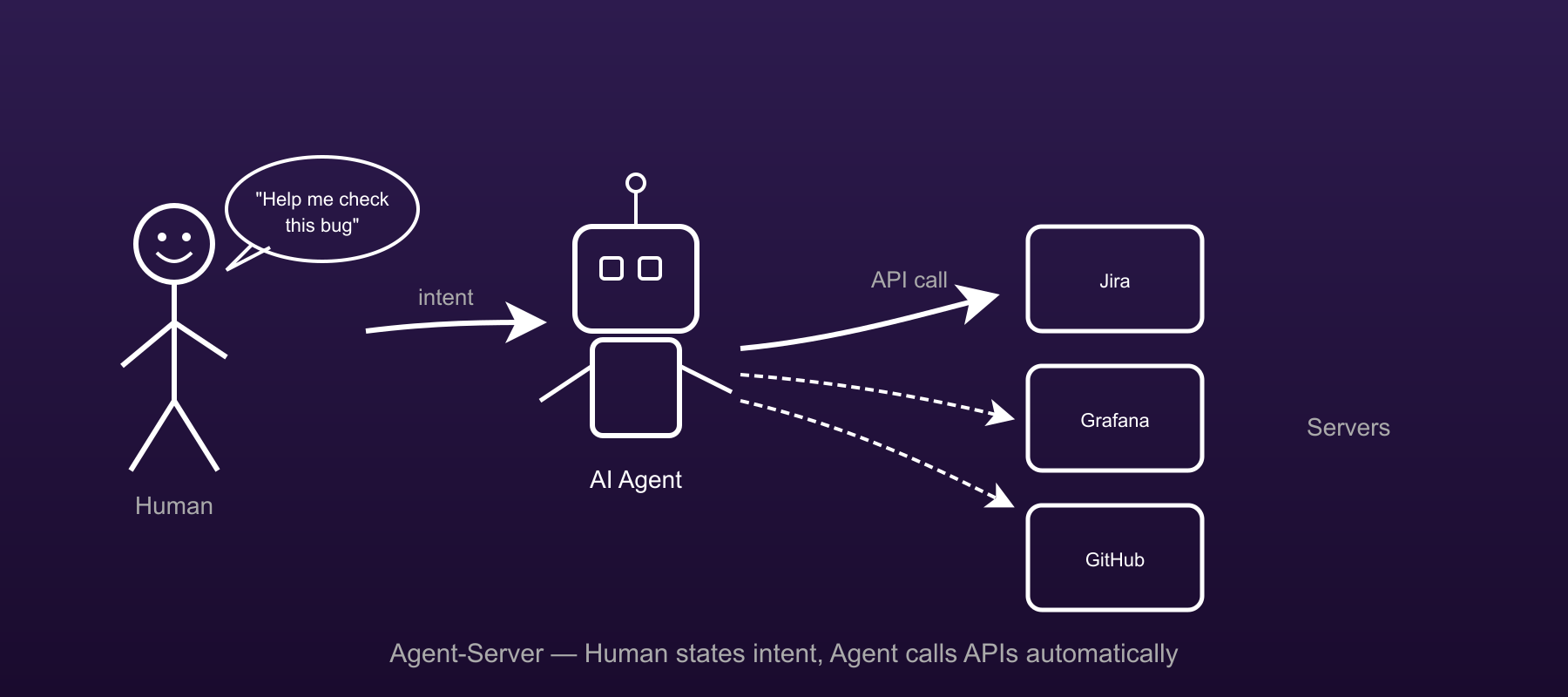
In the new world, you ask the agent to do the diagnosis for you. The agent has language. It can navigate ambiguity, follow instructions that are slightly wrong, and recover from unexpected states. It can hold a forty-step procedure and execute it against a real system.
What it cannot do reliably — without help — is know how your system works. It does not know that your Loki queries require the internal tenant UUID, not the customer-visible name. It does not know that your deployment API returns stale data for thirty seconds after a full-sync. It does not know which team to route a failure to when the failure looks like a platform bug but is actually an application-layer misconfiguration.
The awkward middle
The awkward middle is where most teams are now. They have a powerful agent. They know it can help. They keep discovering — through failed automations, wasted time, and eroded trust — that the agent needs to know things it does not know.
The two naive responses: tell it everything in the system prompt (the system prompt balloons, latency climbs, costs rise), or write special prompts for each specific use case (the special prompts proliferate and go stale). Neither scales.
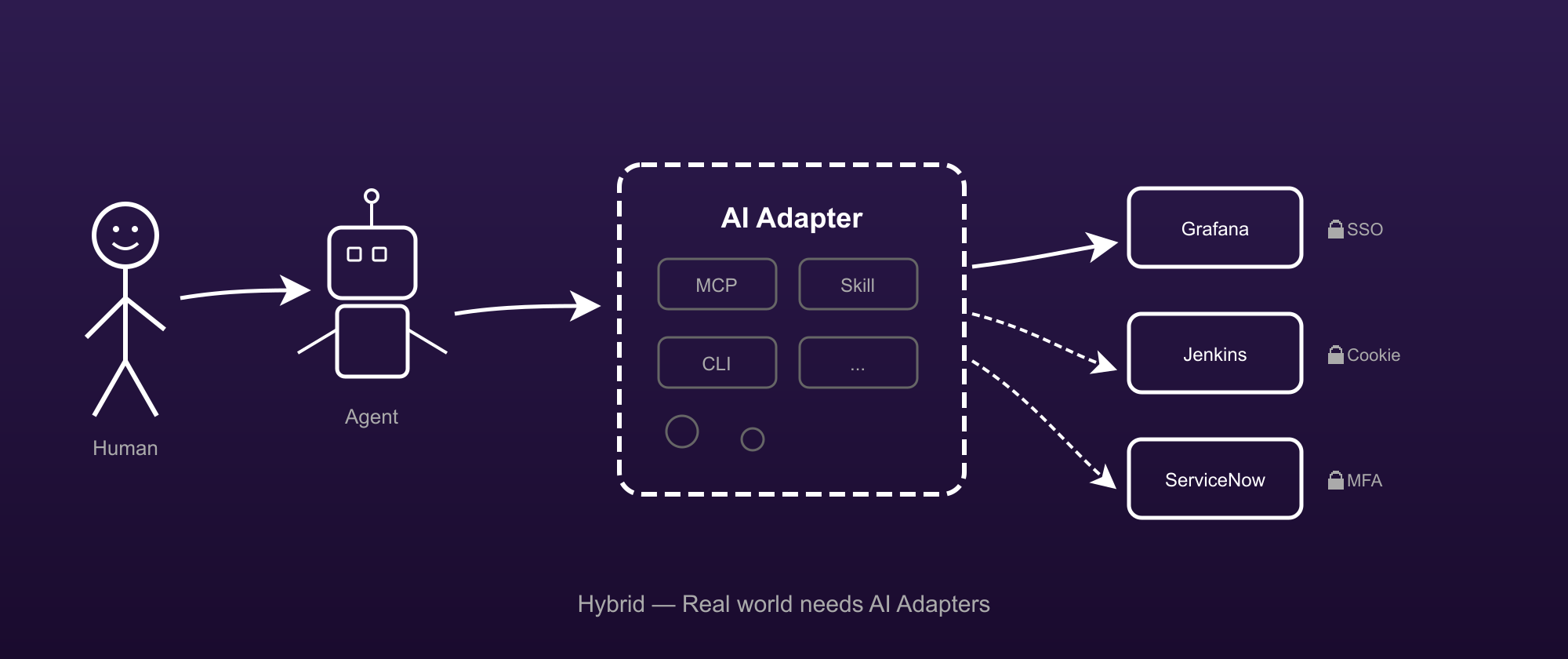
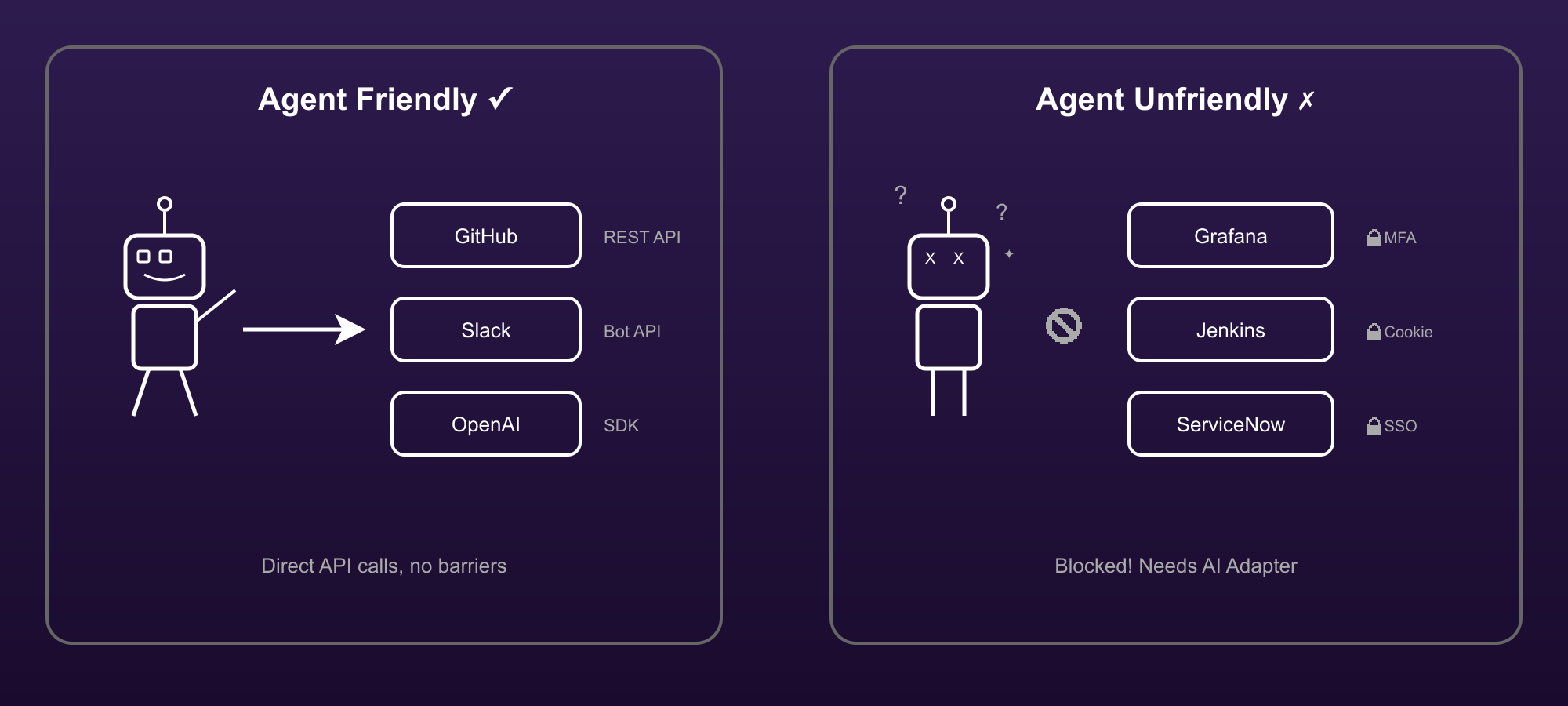
The discipline this book describes — skill engineering — is the third response: encode the knowledge in structured, versioned, executable artefacts that the agent loads when it needs them and that the team can maintain as the world changes.
Chapter 2 — What Is a Skill?
A skill is a versioned, executable description of how an agent should accomplish a recurring task in a specific environment.
That definition has five moving parts, and every one of them is load-bearing.
Versioned
A skill is a document. Documents can be wrong. The team updates them when they discover they are wrong, and the version number tracks the history of those updates. Versioning is how the team knows which skills are current and which need attention.
A prompt that was written once and never updated is not a skill. A system prompt that is edited in place and whose history is not tracked is not a skill. An instruction in a README that “everyone knows to follow” is not a skill. A skill is versioned because the world changes and the artefact must change with it.
Executable
A skill is not just documentation. It is loaded by the agent — typically as a Claude Code skill, placed in ~/.claude/skills/ — and the agent reads it and acts on it. The test of whether a skill works is not whether a human finds it helpful to read; it is whether an agent following it accomplishes the task correctly.
Executability disciplines the writing. You cannot write vaguely and then explain yourself verbally when a colleague is confused. The agent does not ask. The agent reads, interprets, and acts. Prose that works for human runbooks often fails for agent skills because it relies on context the agent does not have.
Description of how
A skill describes a procedure, not a fact. This is the distinction from a knowledge base entry or a FAQ. “The deployment API is at https://api.example.com/deploy“ is a fact. “When you need to trigger a full-sync, call the deployment API with fullMode: true and wait thirty seconds before verifying the result” is a procedure.
The skill is the procedure. Facts appear in the skill where the procedure requires them, not as standalone entries.
Recurring
The forging cost of a skill is not trivial. You explore, crystallise, harden, and ship. That investment is repaid by reuse. A task that is done once does not justify a skill. The 3x Rule (Chapter 6) gives the threshold: if you have done the task three times and each invocation was expensive enough that a working skill would pay for itself in fewer than three more invocations, the skill is worth forging.
One-off tasks should stay as one-off prompts.
In a specific environment
A skill that says “query the Jira API” is not a skill. It is a vague gesture. A skill that says “query the Jira API at https://jira.example.com using the sap-jira sigcli provider, with the project key DC00 for catalog issues” — and specifies the field mappings, the rate limits, the pagination behaviour, the error cases — is a skill.
Specificity is what makes the skill executable. The specific environment is where all the things that differ from the defaults live, and those are the things that the agent needs to know.
Chapter 3 — The Authentication Wall
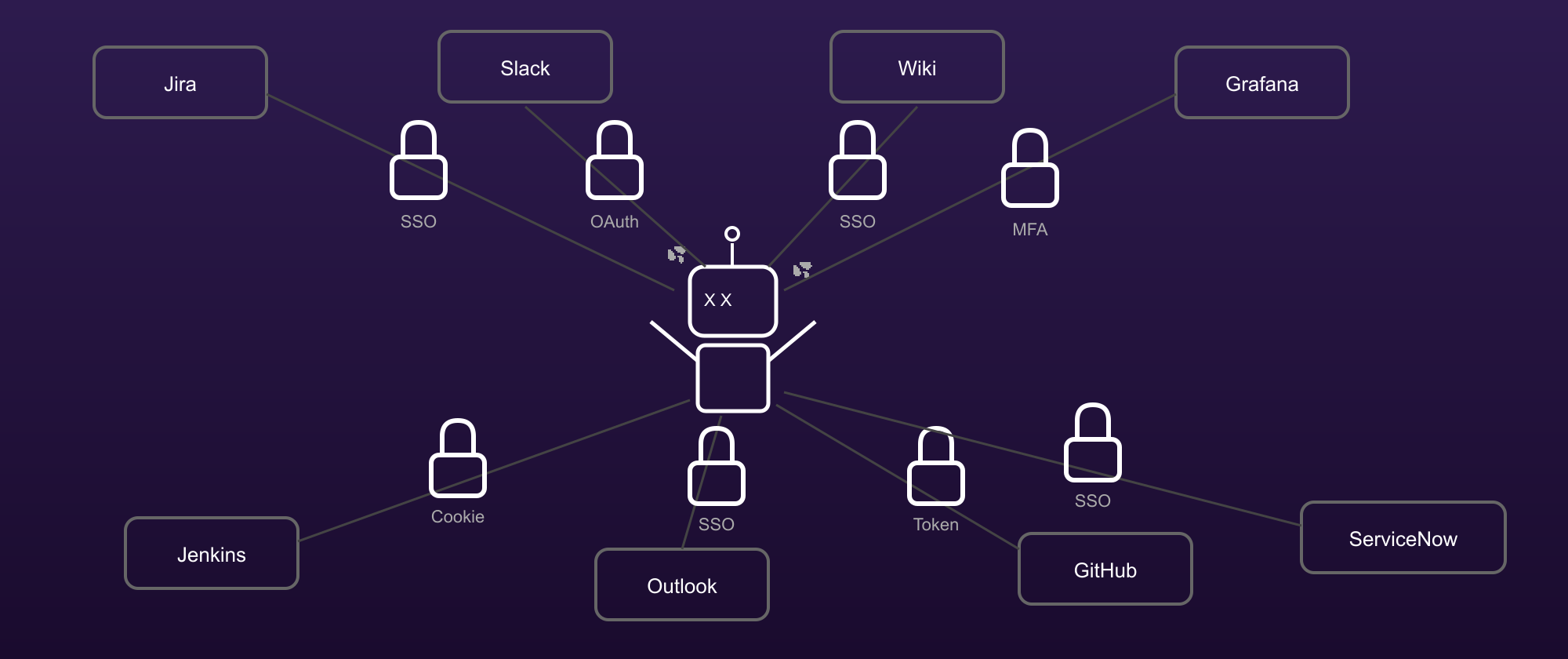
Every enterprise agent hits the authentication wall. The agent needs to call a system. The system requires a credential — a cookie, a token, a session that was established through a browser-based SSO flow, an API key that must not appear in any log. The agent, operating in a language model, has a context window. The context window is observable. Anything that enters it can, in principle, be leaked.
The shape of the wall
The wall is not one thing. It is a cluster of problems:
- SSO-only access. Many enterprise systems do not issue API keys. You get in through the browser, authenticate via your corporate identity provider, and receive a session cookie that is valid for eight hours. There is no machine-readable credential; there is only the cookie.
- MFA barriers. Systems that require a second factor for every session cannot be automated through normal credential injection; the MFA step requires a human.
- Short-lived tokens. OAuth tokens expire. A skill that worked at 9am may not work at 6pm, and the expiry handling is system-specific.
- Credential injection at call time. Many systems require the credential to be injected differently depending on whether the call is a GET or a POST, or depending on the API version, or depending on which endpoint is being called.
The wrong response
The wrong response is to put the credential in the context window. This is the response most teams reach for first, because it is easy: you paste the API key into the system prompt, or you tell the agent to use a specific token you have already generated.
The credential is now in the context window. It can appear in:
- The agent’s trace logs.
- The skill’s history file, if someone logs a session.
- A bug report, if the session is shared for debugging.
- The model provider’s logs, if the provider uses inputs for training.
- An accidentally-committed skill file, if someone copies the session’s context.
None of these is theoretical. All of them have happened.
The right response: the zero-trust proxy
The right response is to put a proxy between the agent and the system. The proxy holds the credentials. The agent tells the proxy “make a GET request to this URL” and the proxy injects the credential at the moment of the HTTP call. The agent’s context window contains only the intent; the credential never enters.
This is the zero-trust principle applied to agentic systems: every component trusts the minimum it needs to trust. The agent trusts the proxy to make authenticated calls. The proxy trusts the identity store. No component holds credentials it does not need.
sigcli is the reference implementation of this proxy for the library this book is written about. Its commands follow a simple grammar:
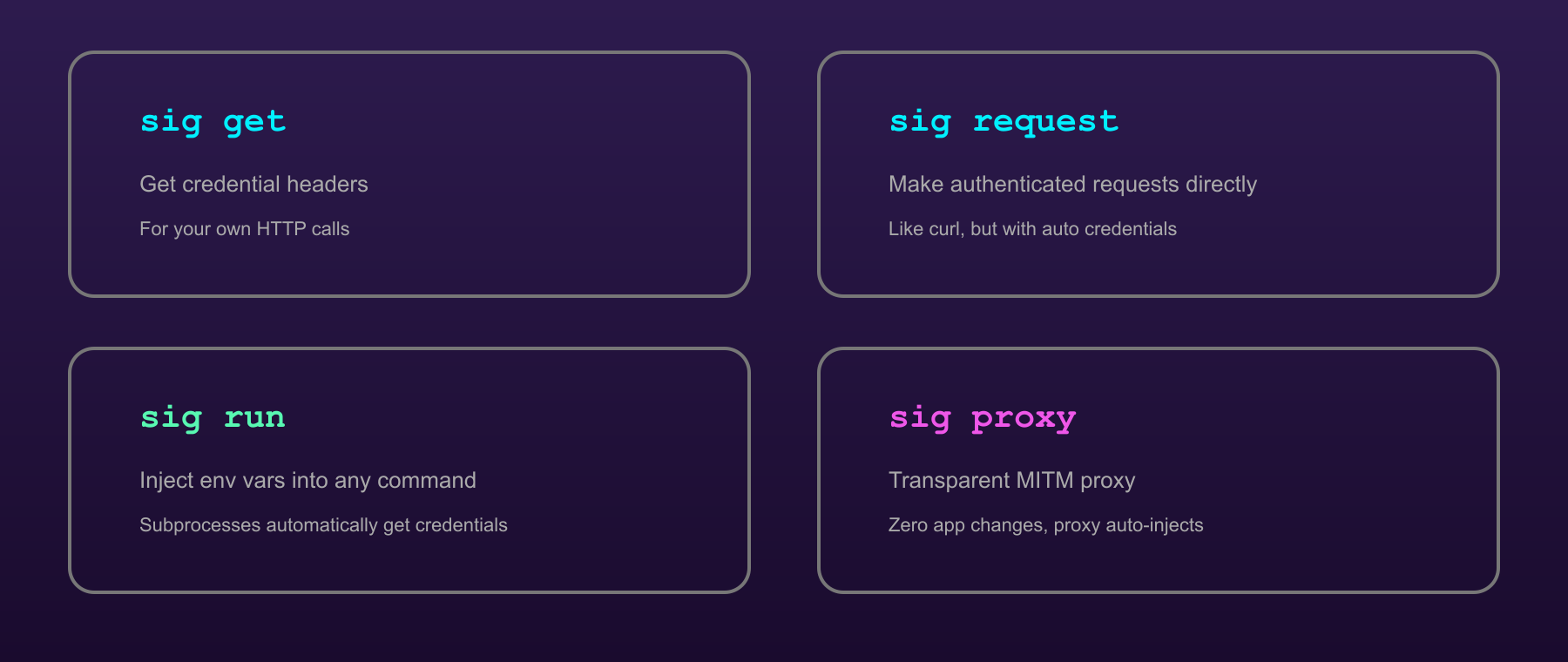
sig login <provider>— establish a session for a named provider (runs the browser-based SSO flow once; stores the credential in the system keychain).sig get <provider> <field>— retrieve a stored credential value for use outside an agent context (for scripts and ad-hoc calls).sig request <provider> <method> <url> [body]— make an authenticated HTTP request through the proxy; returns the response. This is the primary command the agent uses.sig run <provider> <script>— run a script with the provider’s credentials injected as environment variables.sig proxy <provider> <port>— start a local proxy server that forwards requests with the provider’s credentials injected; for tools that need a standard HTTP proxy rather than a custom command.
The skill declares which providers it needs in its frontmatter (auth.providers). The harness checks that the required providers are authenticated before loading the skill. The agent issues sig request calls; the credentials never appear in the context window.
Chapter 4 — The Four Roles
Twenty skills interlink differently than two. A library without structure becomes a flat collection of artefacts that the team cannot reason about: which one do I depend on? which one wraps which? which one is the foundation everything else rests on?
The four roles are a structural vocabulary for this reasoning. Every skill in a well-organised library occupies one of four positions.
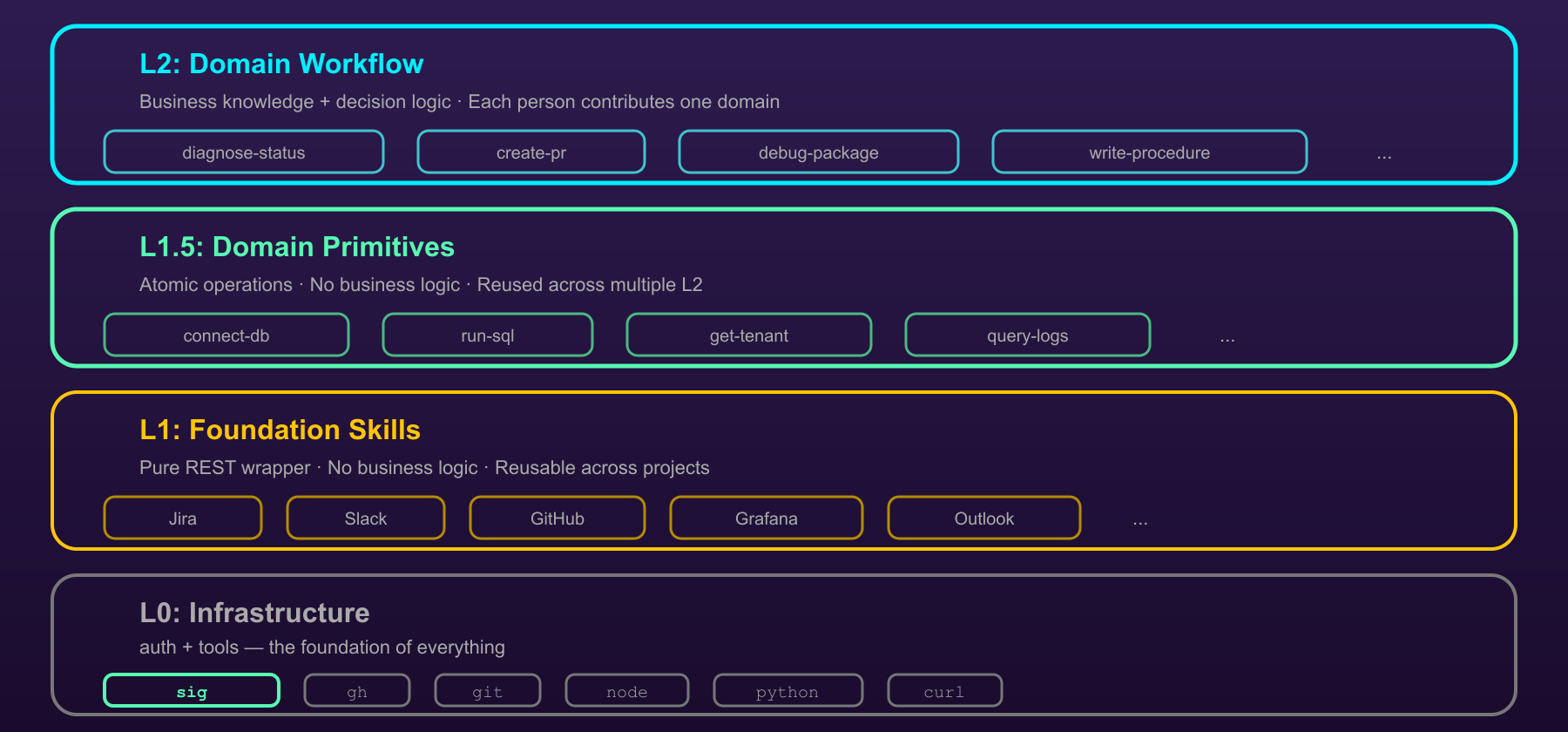
Infrastructure (L0)
The infrastructure layer is the substrate. These are the skills and components that every other skill depends on, directly or indirectly. They change rarely, and when they change, the impact is felt across the library.
In the reference library, sigcli is the infrastructure layer. Every skill that makes an authenticated call depends on it. It is not “just another skill”; it is the foundation, and its health determines the health of every skill above it.
Infrastructure skills have no depends_on in their manifests. They are the bottom of the graph.
Connector (L1)
Connectors are the adapters. Each connector exposes one external system in a form that primitives and workflows can compose without needing to know the system’s API details. sap-jira, sap-loki, sap-github, sap-slack: one connector per external system.
A good connector is thin. It knows the API, the authentication pattern, the pagination behaviour, the error codes. It does not make business decisions. It does not compose with other systems. It exposes the system and gets out of the way.
Connectors depend on the infrastructure (they need sigcli to authenticate) and on nothing else. They are the first layer above the substrate.
Primitive (L1.5)
Primitives are the reusable domain operations. They compose connectors — they use sap-jira to open tickets, sap-loki to tail logs, sap-github to post comments — into operations that have meaning in the team’s domain.
catalog-support-route: given a failure pattern, decide which team to route the support ticket to and open the ticket. That is a primitive: it composes sap-jira (to create the ticket) with domain knowledge (which pattern maps to which team) into a single reusable operation.
Primitives depend on connectors. Workflows depend on primitives.
Workflow (L2)
Workflows are the top of the stack. They compose primitives to solve a specific user-facing problem. The user asks “why is this data product stuck in activating?” and the workflow skill runs: query the stage log, correlate with the pipeline run, check the known-failure patterns, route to the responsible team.
Workflows are the skills users invoke most often and understand least structurally. They are also the most fragile: they depend on everything below them, and if any layer changes, the workflow may need updating.
The composition rule
The composition rule is simple and machine-enforced: a skill of layer L may only depend on skills at the same layer or below. Workflows may depend on primitives and connectors; primitives may depend on connectors; connectors may depend on infrastructure; infrastructure depends on nothing.
The rule prevents upward dependencies: a connector must not depend on a workflow. This would introduce a cycle (the workflow depends on the connector, the connector depends on the workflow) and violate the structural clarity the four roles provide.
The resolver (Chapter 13) enforces the rule at install time. A skill that violates it cannot be installed.
A worked example
The diagnose-product-status workflow:
- Depends on
sap-loki(connector): to query the stage log. - Depends on
sap-jira(connector): to look up relevant support history. - Depends on
catalog-support-route(primitive): to route the result to the correct team.
None of those dependencies know about each other. The workflow composes them; the connectors and primitives are unaware of the composition. This is the intended structure.
Chapter 5 — The Anatomy of a Skill
A skill is a directory. The directory has a canonical layout, and every file in it has a purpose.
1 | diagnose-product-status/ |
SKILL.md
The core of the directory. A Claude Code skill file with a YAML frontmatter block at the top and a prose body below.
The extended frontmatter this book recommends:
1 |
|
The fields Claude Code reads natively: name, description. Everything else is consumed by the library’s tooling: the resolver reads depends_on and layer; the lifecycle system reads status; the CI check enforces consistency between manifest.yaml and the frontmatter.
The prose body has a canonical structure:
- Overview — one to three sentences. What the skill does, when to use it, what it depends on.
- Constraints — a short list of things the agent must not do or must be careful about. The pitfall ledger (Chapter 7) feeds directly into this section.
- Instructions — the procedure, numbered and sequential. This is the skill’s core.
- Self-Test — a runnable check: a prerequisite test (does
sig loginsucceed?) and a live test (does the skill return a result for a known-good input?). - Troubleshooting — patterns the skill has encountered in the past and how to address them.
manifest.yaml
The machine-readable mirror of the frontmatter. The harness and the resolver read the manifest for performance (parsing YAML is faster than parsing Markdown + YAML front matter) and for CI validation. The canonical schema is in Appendix A.
scripts/
Helper scripts the skill’s prose body calls. Python one-liners that query an API, format a response, or transform data. Kept here rather than inlined in the skill prose for readability and testability.
references/
Supplementary material for progressive disclosure. The skill prose stays short (the discipline is ≤ 500 lines); detailed API documentation, historical context, and reference tables live here and are consulted only when the prose instructs the agent to look.
evals/
The test suite. evals/basic.yaml contains the cases; evals/fixtures/ contains the input JSON for each case. The eval runner (Appendix B) reads this directory and verifies the skill against a real agent. Chapter 9 covers evals in detail.
history/
The evolution ledger. v0_evidence.md is the creation rationale. Subsequent entries (v1.md, v1_evidence.md, etc.) record each accepted evolution. Chapter 22 covers the ledger in detail.
Series footer:
Part 1 of 6 — Skill Engineering
Part 1: Foundations · Part 2: Creation · Part 3: Governance · Part 4: Evolution · Part 5: Outlook · Part 6: Appendices